
Vista Auction
Vista AuctionShopping
3.654.00 Reviews
- Version
- 1.16.0
- Installs
- 10.00K
- Age Rating
- Everyone
Screenshots

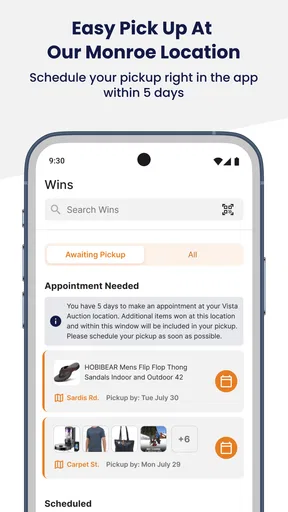
Our Review of Vista Auction
 Analysis by Appyee
I approached Vista Auction as a shopping app for people who prefer browsing local auction opportunities from a phone rather than checking scattered listings or visiting in person first. Its simple promise is appealing: find something nearby, decide what it is worth to you, and place a bid without turning the process into a full-time project. In my experience, that makes the app most interesting when you already enjoy auctions but want a more convenient way to keep an eye on them.
The app is free, developed by Vista Auction, and aimed at everyone rather than a narrow age group. It has reached over ten thousand installs and carries an average rating of 3.6 from around one hundred twenty ratings, so I would describe it as a small but established shopping tool rather than a dominant marketplace. It was released on November 27, 2025, and the current version is 1.16.0, with support beginning at Android 8.0. Those details matter if you are using an older phone or deciding whether this is mature enough to become your only auction-shopping tool.
How Vista Auction feels to use in everyday situations
I find the everyday value of Vista Auction lies in using it to explore local possibilities before committing to a trip or a bid. In the next section, I’ll look at how that browsing habit can fit around ordinary plans—and why a little preparation makes local auction shopping feel more manageable.
Readable browsing and straightforward navigation
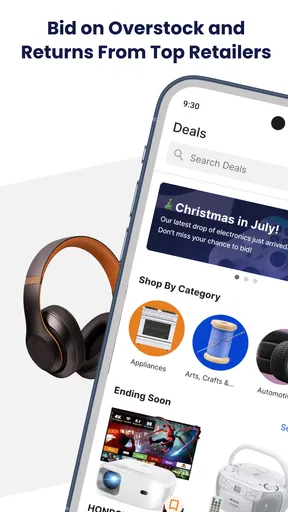
The strongest part of the concept is its focus. This is not trying to be a general online department store with auctions hidden among ordinary product pages. The experience is built around local bidding, which gives the browsing task a clearer purpose. I can imagine opening it with a specific intention—checking furniture, looking for tools, or seeing what is available before a weekend trip—rather than endlessly scrolling through unrelated retail recommendations.
That local focus also changes how I judge the information on screen. A useful auction listing needs to answer practical questions quickly: what is being sold, where it is located, when action is required, and whether the item is worth the effort of collecting. When an app keeps those details close to the listing rather than making me hunt through several screens, it reduces the mental load of comparing lots. For users who find busy shopping platforms tiring, a narrower purpose can be a real advantage.
At the same time, auction browsing is naturally more demanding than ordinary shopping. A product page in a conventional store usually leads to one clear action: buy or save. An auction app asks me to interpret an item, judge its condition, remember a deadline, consider travel, and decide how much I am comfortable spending. Vista Auction can make that process more convenient, but it cannot remove the decisions themselves. I would still slow down and read each listing carefully instead of treating a low current bid as a bargain.
My practical advice is to browse in two passes. First, use the app to identify lots that match your needs and location. Then return to the promising ones and check every visible detail before bidding. This prevents a common mistake in local auctions: becoming excited by an attractive item before noticing that collection would be inconvenient or that the lot is not quite what you expected.
Useful for planned shopping, less useful for impulse buying
A realistic example would be someone furnishing a new apartment. Instead of visiting several resale shops after work, they could use the app to scan local auction options, make a short list of suitable tables or storage pieces, and decide which listings justify further attention. The benefit is not simply finding a lower price. It is being able to combine discovery with location-based planning, which is especially important when larger items may require transport.
I would not use it in the same way as a major retail marketplace. If I need a specific phone charger tonight, a normal store app is better because stock, price, delivery, and checkout are usually more predictable. Vista Auction makes more sense when I am open to alternatives and willing to trade certainty for the possibility of finding something unusual or better suited to a local pickup.
That trade-off is easy to overlook. Auction shopping rewards patience and selectivity, while standard shopping rewards speed. If you dislike deadlines, changing bids, or the possibility of leaving without the item you wanted, this format may feel more stressful than helpful. The app is a better fit for someone who sees the search itself as part of the experience.
Motor and sensory considerations while bidding
From an inclusive-use perspective, the most important question is whether the app lets a user complete the core journey without unnecessary effort: discover a lot, understand it, and bid with confidence. A focused shopping interface can help users who have limited time or who become overwhelmed by large marketplaces. Fewer competing categories and a local purpose make it easier to build a repeatable routine.
That routine can be adapted to different physical abilities. Someone with limited hand movement may prefer to browse slowly, prepare a shortlist, and avoid repeated tapping across many listings. Someone who tires easily from screen use could check only nearby auctions and ignore lots that would require a long trip. A user with attention difficulties might benefit from writing down a personal spending limit before opening the app, so the auction atmosphere does not push the decision in a different direction.
These are user strategies rather than proof of specialized accessibility support. I would not assume that every control, label, or status message works equally well with every assistive setup. If you rely on large text, screen reading, magnification, voice control, or strong contrast, test the actual screens on your device before depending on the app for time-sensitive bidding. The app’s general audience positioning is encouraging, but it should not be confused with a formal accessibility certification.
Sensory comfort also matters. Auction browsing can create urgency even when the interface itself is calm, because deadlines and changing interest naturally encourage repeated checking. For users who are sensitive to pressure, the best approach is to decide a maximum amount and a collection plan before interacting with a listing. This turns the app into a research tool rather than a source of constant temptation.
For people with visual fatigue, I would avoid trying to evaluate a complicated lot during a rushed commute. Save the serious comparison for a quiet place, enlarge the device display if needed, and read the description in full. The app may help you find opportunities, but the responsibility for understanding an item still rests with the bidder. That distinction is important: convenience is not the same as clarity.
Access in different places and daily contexts
Vista Auction is most convincing when it is used as part of a local errand. I can see myself checking listings at home, selecting a few realistic possibilities, and then planning a route around collection. That workflow is more inclusive than treating every auction as equally available. A nearby item may be practical for one person and completely unsuitable for another because of transport, work hours, mobility, or the need for assistance.
Location should therefore be treated as part of the price. Before bidding, I would consider travel time, parking, carrying requirements, and whether someone else needs to come along. This is one of the app’s less obvious trade-offs: local access can make an auction feel convenient, but it can also expose practical barriers that do not appear in the bid amount. A cheap item is not necessarily economical if collecting it requires an expensive or physically difficult journey.
The app can also fit different levels of involvement. A casual user might open it occasionally to see what is available nearby. A regular auction buyer could create a personal routine: browse on a chosen day, shortlist only suitable lots, review the details later, and stop once the list is manageable. That second approach is better for users who need predictable structure, because it avoids repeatedly checking every possible listing.
I would be cautious about bidding while distracted. Public transport, noisy workplaces, and busy streets are poor environments for making decisions about item condition or collection. If you have difficulty concentrating in those settings, use the app for discovery only and complete the final review somewhere calmer. This is a small change, but it lowers the chance of confusing an interesting listing with a practical purchase.
Another useful habit is to separate “want” from “can use.” Local auctions often make unusual items feel urgent because they may not appear again soon. Before bidding, I would ask whether the item fits my space, schedule, and ability to collect it. That question is particularly helpful for older users, people living alone, and anyone who depends on another person for transport or lifting.
Where the experience still has friction
The average rating of 3.6 suggests a mixed experience rather than universal approval. I would read that as a reason to keep expectations measured. The app’s purpose is clear, but clarity of purpose does not guarantee that every listing will be equally easy to assess or that every auction will suit every shopper. A local auction platform depends heavily on the quality and completeness of the items being presented, so the usefulness of one browsing session may vary considerably from another.
The biggest barrier is the knowledge gap between ordinary shopping and bidding. New users may understand how to browse but still feel uncertain about how much research is enough, when to stop, or how to judge whether a local pickup is worthwhile. Vista Auction is not a replacement for personal caution. I would never treat the current bid as a reliable measure of an item’s value, and I would not assume that a low figure remains low by the time I am ready to act.
Time pressure is another barrier. Anyone who needs extra time to read, compare, or ask another person for help may find auction deadlines difficult. The sensible response is to shortlist early rather than waiting until the final moment. If a listing requires careful inspection or outside advice, begin that process as soon as you notice it. Waiting until the end makes the app less accessible, regardless of how simple the navigation feels.
There is also a difference between finding an item and completing the whole purchase journey. A person may be able to browse independently but still need help with transport, lifting, payment decisions, or collection. I would include those steps in the decision from the start. For a user with limited mobility, the best listing is not necessarily the closest one; it is the one whose entire collection process is manageable.
Users on older devices should pay attention to compatibility. Android 8.0 is the stated minimum operating system, so anyone below that threshold will need another option or a newer device. Even on a supported phone, a small screen or an aging battery can make long listing reviews uncomfortable. That does not make the app unusable, but it does make device setup part of the experience.
How it compares with familiar shopping alternatives
Compared with a general marketplace, Vista Auction offers a more specialized route into local bidding. A broad resale platform may provide a larger variety of sellers and fixed-price items, while this app is more appealing when the auction format and local angle are central to what I want. The advantage is focus; the disadvantage is that I cannot expect the same kind of immediate, predictable purchase as I would from ordinary retail.
Compared with visiting a physical auction, the app is more convenient for initial discovery. I can screen opportunities before spending time travelling, which is valuable for anyone with limited energy, limited transport, or a tight schedule. The physical visit still has an important advantage, though: seeing an item directly can make condition and size easier to judge. For expensive, fragile, or difficult-to-collect purchases, I would prefer a process that allows as much inspection and planning as possible.
Compared with fixed-price local listings, bidding introduces uncertainty but may also reveal items I would not search for by exact product name. That makes Vista Auction a good companion for flexible shoppers. It is not my first recommendation for someone who already knows the exact model, colour, or specification they need and wants a guaranteed transaction.
Who should use it and who should skip it
I would recommend trying Vista Auction if you enjoy discovering local items, can make decisions without rushing, and are comfortable treating collection logistics as part of the purchase. It is particularly suitable for bargain hunters, people furnishing a home gradually, collectors who like unexpected finds, and shoppers who prefer to explore nearby options before committing to a standard retail price.
I would be more cautious recommending it to someone who needs guaranteed availability, delivery certainty, or a very specific product immediately. It may also be a poor match for users who find bidding emotionally uncomfortable or who cannot easily arrange collection. In those cases, a conventional shopping app or a fixed-price local marketplace will probably create less friction.
The free price makes experimenting easier, and the everyone rating means it is positioned for a broad audience. Still, free access does not eliminate the cost of time, travel, or an unsuitable purchase. I would start with modest expectations, browse a few local opportunities, and learn how the listings fit into my routine before making the app a regular part of shopping.
My inclusive verdict
Vista Auction has a useful, specific role: it brings local auction browsing into a phone-based shopping workflow without pretending that auctions are the same as ordinary checkout. I like it most as a planning tool—something that helps me discover possibilities, compare practical options, and decide whether a local opportunity deserves further attention.
Its inclusive value comes less from any promised specialist feature and more from the way a focused local workflow can be adapted. Browsing at home, shortlisting early, setting a spending boundary, and checking transport before bidding can make the experience more manageable for people with different energy, mobility, attention, or sensory needs. Those habits also improve the experience for almost anyone.
There are real limits. Auction deadlines can disadvantage people who need more time, local collection can create barriers that are invisible on the screen, and the mixed 3.6 average means I would not assume a flawless experience. I would also test the app on my own device if I depend on accessibility settings, rather than relying on general audience language as a guarantee.
Overall, I see Vista Auction as a worthwhile free experiment for flexible local shoppers, not a universal replacement for retail or fixed-price marketplaces. If you approach it with a plan, check the practical details, and treat the bid as only one part of the decision, it can make local auction discovery considerably easier. If certainty and speed matter more than exploration, another shopping option will likely serve you better.
Verdict
Strengths of Vista Auction
- Clear auction listings with item details and bidding information.
- Convenient access to auctions from a mobile device.
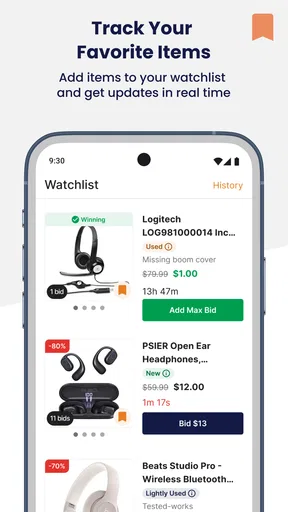
- Useful notifications help users keep track of auction activity.
- Simple interface makes browsing available lots straightforward.
- Supports faster participation without needing a desktop browser.
Limitations of Vista Auction
- Auction availability may depend on your location and local listings.
- Some items may have limited photos or incomplete descriptions.
- Bidding requires careful attention to deadlines and changing prices.
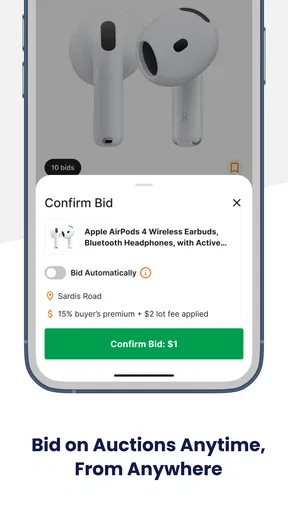
- Additional buyer fees may not always be obvious at first glance.
- App performance can vary depending on connection quality and device.
Similar Picks in This Category
View All
SHEIN-Shopping Online
Roadget Business PTE. LTD.4.8

Amazon Shopping
Amazon Mobile LLC4.4


Mercado Libre: Compras online
Mercado Libre4.8

Wish: Shop and Save
Wish US Holdings LLC4.7

Alibaba.com - B2B marketplace
Alibaba Mobile4.4
Frequently Asked Questions
What is Vista Auction, and how does it work?
Vista Auction is an online auction platform where users can browse listed items, review available descriptions and photographs, and place bids through the app or website. After creating an account, you can follow auctions, monitor competing bids, and receive updates about lots that interest you. The exact bidding process, auction schedule, and available categories may vary depending on the listings and region.
Do I need an account to bid on items in Vista Auction?
Yes, users generally need to register for an account before placing bids. The registration process may require basic personal information, contact details, and acceptance of the platform’s terms. Before bidding, it is important to check whether your account has been fully verified and whether Vista Auction requires payment or identity verification details. Browsing listings may be possible without registering, but bidding normally is not.
Are there additional fees when buying through Vista Auction?
The winning bid may not be the final amount you pay. Depending on the auction and location, Vista Auction purchases can include buyer’s premiums, taxes, service charges, shipping costs, storage fees, or payment-processing charges. Always read the individual lot information and auction terms before submitting a bid. These details should explain the total expected cost and the accepted payment methods.
Can I cancel a bid or return an item after winning?
Bids placed in an auction are often treated as binding commitments, so cancellation may not be available simply because you changed your mind. Return policies can also differ from ordinary retail purchases, especially when items are sold as used, surplus, collectible, or final-sale property. Before bidding, carefully review the lot description, condition notes, photographs, inspection options, and the auction’s cancellation and return rules.
Is Vista Auction safe to use, and what should I check before bidding?
Using Vista Auction responsibly means checking the seller or auction organizer information, reading all terms, and confirming that the listing includes enough details about condition, ownership, pickup, delivery, and payment. Avoid relying only on photographs, and be cautious if a listing seems unusually cheap or requests payment outside the official process. Use a strong password, protect your account information, and contact official support if anything appears suspicious.
